Description
ABB TK811V015 3BSC950107R1
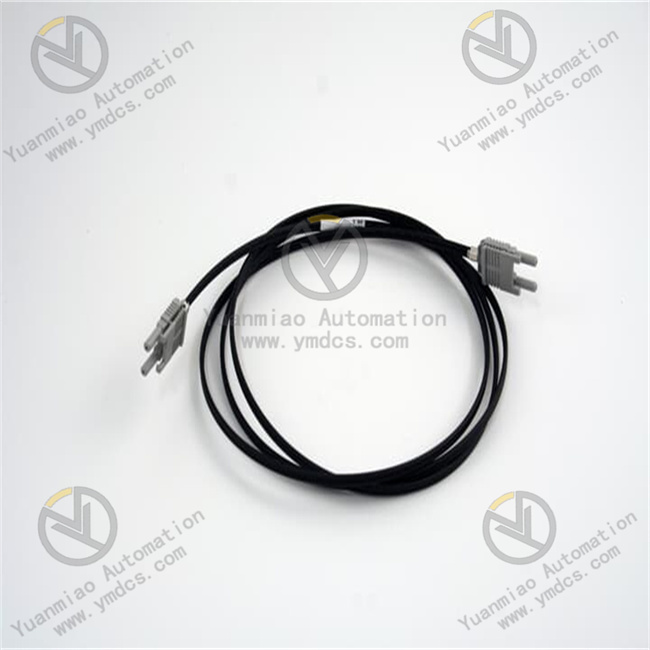
ABB TK811V015 (3BSC950107R1) is an original duplex plastic optical fiber (POF) exchange cable designed specifically for the ABB 800xA system S800 I/O modules. With a length of 1.5 meters and duplex latching connectors, it serves as a core component for high-speed short-distance signal transmission in industrial control systems. It is responsible for building optical fiber communication links between S800 I/O modules or between I/O modules and controllers, enabling high-speed, interference-free interaction of command transmission, data acquisition, and status feedback. Compatible with multiple versions such as S800 I/O 4.0 and 4.1, it is a dedicated supporting component for short-distance optical fiber connections in cabinets of 800xA distributed control systems, widely used in harsh industrial scenarios such as electric power, petrochemical, and metallurgy to ensure the stability and reliability of system signal transmission.
I. Functions and Technical Advantages
1. Core Functions
- Duplex Optical Fiber Communication: Adopting a duplex plastic optical fiber (POF) design, with dedicated duplex latching connectors at both ends, it builds a stable optical fiber communication channel, supporting high-speed signal transmission without electromagnetic interference, ensuring the integrity and low latency of data transmission, and adapting to the communication needs of S800 I/O modules.
- 1.5-Meter Standard Adaptation: The 1.5-meter standard cable length accurately adapts to the short-distance connection needs of S800 I/O modules in the 800xA system control cabinet. No additional cutting or extension is required; it can be deployed directly out of the box, greatly reducing on-site wiring and commissioning man-hours and improving deployment efficiency.
- Special Adaptation for S800 I/O: Designed specifically for the S800 I/O modules of the 800xA system, it perfectly matches the module interface definition and communication protocol, supporting multiple versions such as S800 I/O 4.0 and 4.1. It can realize inter-module interconnection and signal interaction between modules and controllers, helping to build a distributed control network.
- Latching Quick Connection: Equipped with duplex latching connectors, it is convenient to plug and unplug, firmly connected, and has an anti-falling design. It can be quickly installed and replaced, facilitating cable replacement during later system maintenance, module expansion, or fault diagnosis.
2. Key Advantages
- Genuine Precision Compatibility: Designed and manufactured by ABB, with the material code corresponding to EXC3BSC950107R1, it is 100% compatible with all S800 I/O modules of the 800xA system. It eliminates hidden dangers such as interface misalignment and signal attenuation of third-party cables, ensuring zero-fault operation of the communication link.
- Industrial-Grade Anti-Interference Capability: Using plastic optical fiber (POF) as the transmission medium, it completely avoids electromagnetic interference (EMI) and radio frequency interference (RFI), adapting to strong interference environments such as inverters and motors in industrial sites, and ensuring that signal transmission is not affected by the outside world.
- High Durability Design: The optical fiber cable is made of wear-resistant and flame-retardant insulating material, and the connector is made of high-quality engineering plastic, which has bending resistance and tensile resistance. It adapts to the installation environment in the industrial control cabinet, can operate stably for a long time, and is not easy to be damaged.
- Compliant and Convenient Operation & Maintenance: Complies with international industrial electrical safety standards and passes CE certification. Originated in Sweden, the product has a net weight of only 0.02kg and a small size, which is convenient for wiring and sorting in the cabinet; clear cable identification facilitates on-site identification and management, reducing later maintenance difficulty.
II. Technical Specifications
Category | Item | Value |
|---|---|---|
Basic Specifications | Model | TK811V015 (3BSC950107R1) |
Product Type | Duplex Plastic Optical Fiber (POF) Exchange Cable for 800xA System S800 I/O | |
Applicable System/Module | ABB 800xA System, S800 I/O 4.0, 4.1 and other versions of I/O modules | |
Cable Length | 1.5 Meters (1500mm) | |
Transmission Type | Duplex Plastic Optical Fiber (POF) | |
Electrical & Interface | Interface Type | Duplex Latching Connector |
Transmission Medium | Plastic Optical Fiber (POF) | |
Material Code | EXC3BSC950107R1 | |
Environmental & Mechanical | Operating Temperature | -40℃~+70℃ (Adapts to the operating temperature range of S800 I/O modules) |
Storage Temperature | -40℃~+85℃ | |
Protection Degree | IP20 (Cable Itself), Must be installed in IP54 or higher control cabinet | |
Net Weight | Approx. 0.02kg | |
Place of Origin | Sweden |
III. Application Areas
- Power Automation: In the 800xA distributed control system of power plants and substations, it is used for short-distance optical fiber communication between S800 I/O modules, realizing power parameter collection, equipment status monitoring, and control command transmission, ensuring the stable operation of the power system.
- Petrochemical Industry: In the 800xA system of chemical production, petroleum refining and other scenarios, the optical fiber connection between S800 I/O modules and controllers adapts to harsh environments such as strong electromagnetic interference and high temperature, ensuring real-time transmission of process parameters and accurate issuance of control commands.
- Metallurgical Industry: In the 800xA control system of iron and steel, non-ferrous metal smelting production lines, it is used for signal interaction between S800 I/O modules, realizing automatic control of smelting processes and improving production efficiency and product quality.
- System Commissioning & Expansion: During the new installation of the 800xA system, quickly build the optical fiber communication link of S800 I/O modules for parameter configuration and function verification; when expanding the system, easily connect new I/O modules to maintain the standardization and stability of the communication link.
IV. Installation and Use Guide
1. Pre-Installation Preparation
- Model & Interface Verification: Confirm that TK811V015 (3BSC950107R1) is compatible with the used 800xA system S800 I/O module version (4.0/4.1, etc.); check the integrity of the cable package, no damage to the connector, no breakage of the optical fiber, intact latching structure, which can be normally plugged and unplugged.
- Environment and Safety: Disconnect the power of the S800 I/O module and related equipment, wait for the capacitor to discharge for ≥ 5 minutes; wear an anti-static wristband to avoid static damage to the module interface; the installation environment must be dry, free of condensation and dust accumulation, and away from strong electromagnetic interference sources.
- Tools and Materials: Prepare a cleaning brush (to clean interface dust) and optical fiber cleaning paper (to wipe the optical fiber end face); clean the dust and foreign objects in the optical fiber interface of the S800 I/O module to ensure the interface is clean and avoid affecting signal transmission.
2. Installation and Use Operation
- Interface Cleaning: Use a cleaning brush to clean the optical fiber interface of the S800 I/O module, then gently wipe the optical fiber end face of the cable connector with optical fiber cleaning paper to remove dust and oil stains, ensuring the optical fiber end face is clean and avoiding signal attenuation.
- Cable Connection: Align the duplex latching connectors at both ends of the TK811V015 cable with the corresponding optical fiber interfaces of the S800 I/O module respectively, push gently, and a "click" sound indicates that the latching is locked and the connection is firm; ensure that the connector is closely attached to the interface without looseness.
- Wiring Check: Sort out the cable routing, avoid excessive bending, squeezing of the cable or scratching by sharp parts of the cabinet components, reserve an appropriate amount of slack to prevent optical fiber breakage; ensure that the cable identification faces the direction that is easy to observe, facilitating later identification and maintenance.
- Inspection and Confirmation: Pull both ends of the cable gently to confirm that the connector is not loose and the optical fiber is not pulled; after power-on, check the communication status through the 800xA control software to confirm that the signal transmission is normal without packet loss, attenuation and other abnormal conditions.
3. Maintenance and Replacement
- During daily maintenance, regularly check whether the cable appearance is damaged, the optical fiber is broken, and the connector is loose; regularly clean the optical fiber interface and connector end face to avoid dust accumulation leading to signal attenuation and ensure stable communication.
- When the module is replaced or communication is abnormal, press the connector latch, gently pull out the cable, and check whether the optical fiber end face is contaminated or damaged; if the cable is damaged, directly replace it with a new original TK811V015 cable, reconnect and verify the communication status.
- Avoid using corrosive cleaning agents to wipe the connector and cable to prevent material aging; when storing, coil the cable neatly to avoid excessive bending, store it in a dry and cool environment, away from high temperature, humidity and strong electromagnetic interference sources.
V. Common Problems and Solutions
- Connector cannot be inserted into the interface or is difficult to plug and unplug: Check if the interface model is a dedicated optical fiber interface for S800 I/O modules; check if the connector latch is deformed or damaged; clean the dust and foreign objects in the interface, align the interface and push gently, do not force plugging and unplugging to avoid damaging the interface and connector.
- Communication signal attenuation and packet loss: Check if the optical fiber end face is clean and scratched; check if the cable is excessively bent and the optical fiber is broken; wipe the optical fiber end face with optical fiber cleaning paper, adjust the cable routing to avoid bending; if the optical fiber is broken, replace it with a new cable.
- Connector is loose or falls off after connection: Confirm that the connector has been fully pushed in and the latching lock sound is heard; check if the latch is aging or damaged; re-plug the connector and confirm that it is locked firmly; if the latch is damaged, replace it with a new cable.
- No Communication Response: Check if the cable model is compatible with the S800 I/O module version; check if the connector connection is firm and the optical fiber is intact; use an optical fiber tester to detect the continuity of the cable to eliminate internal optical fiber breakage faults; check if the module interface is normal.