Description
1. Product Overview
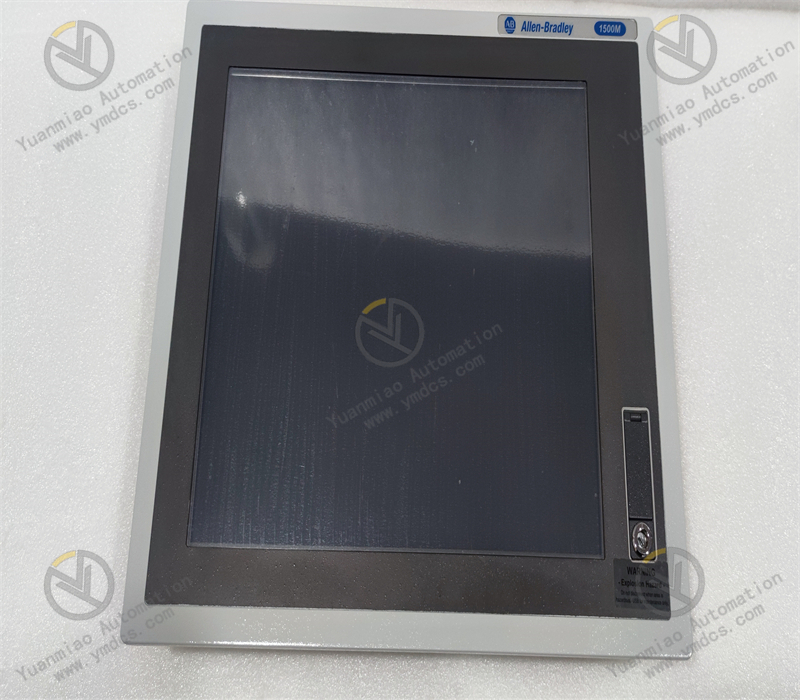
Allen‑Bradley 6186M‑15PT is a high‑performance 15‑inch industrial touch‑screen monitor from Rockwell Automation 6186M series, developed for harsh industrial‑site operating conditions. Different from all‑in‑one industrial PCs, this unit is a pure display‑touch terminal and must be used together with an external industrial host. It features an industrial reinforced structure with an aluminum‑alloy bezel, equipped with a high‑definition industrial TFT‑LCD screen and a durable resistive touch panel, delivering industrial‑grade properties of high brightness, wide viewing angle, vibration resistance and strong anti‑interference capability. Fully compatible with the full range of Rockwell Automation control systems as well as third‑party industrial hosts, the product is mainly used for on‑site human‑machine interaction, process‑screen display, equipment operation management and visual monitoring of production conditions. Widely deployed in intelligent manufacturing, process chemical, water‑treatment, power‑energy, metallurgy, oil‑gas and other industries, it supports 7×24‑hour non‑stop factory operation and serves as a standard auxiliary display terminal for industrial operation consoles and control‑cabinet supervisory monitoring.
2. Core Technical Parameters
2.1 Basic Specifications
- Model: 6186M‑15PT
- Product Series: 6186M Performance High‑performance Industrial Monitor
- Screen Size: 15‑inch industrial LCD display
- Touch Type: Industrial resistive touch, glove‑operable, anti‑false‑touch, wear‑resistant and scratch‑proof
- Unit Type: Pure display‑touch terminal with no built‑in host, designed for matching external industrial PC
- Bezel Material: Light‑weight high‑strength aluminum‑alloy, rigid and deformation‑resistant
2.2 Display & Touch Parameters
- Native Resolution: 1024×768, adaptive multi‑resolution compatibility
- Screen Brightness: 450 cd/m² high‑brightness display for well‑lit workshops, clear image without reflection
- Display Colors: 16.2‑million‑color high‑definition output, rich image layers and accurate presentation of process parameters
- Active Display Area: 304 mm × 228 mm wide‑view design, consistent color from multiple viewing angles
- Touch Service Life: Extended industrial‑grade touch lifespan, suitable for high‑frequency on‑site operations
2.3 Interface & Electrical Parameters
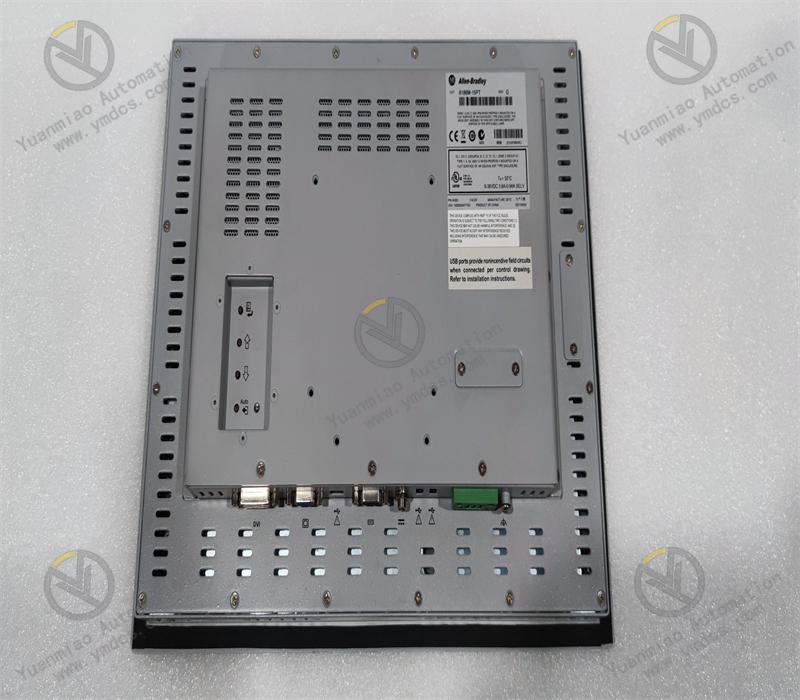
- Video Inputs: Dual VGA and DVI‑I video ports, compatible with video output of various industrial hosts
- Touch Interface: Standard USB touch‑signal port, plug‑and‑play with stable signal transmission
- Power Supply: Standard industrial DC power supply, matching common power‑supply schemes of industrial control cabinets
- Electrical Performance: Industrial‑grade electrical isolation design, surge‑proof and voltage‑fluctuation‑resistant for complex industrial power environments
2.4 Environmental, Protection & Structural Parameters
- Operating Temperature: 0 ℃ ~ +55 ℃, suitable for ambient workshop temperature, thermostatic cabinets and mildly high‑temperature conditions
- Storage Temperature: ‑20 ℃ ~ +70 ℃, safe and stable during equipment transportation and storage
- Operating Humidity: 5%‑95% RH, non‑condensing, adapted to humid industrial‑site environments
- Front‑panel Protection: Compliant with NEMA industrial standards; dust‑proof, splash‑water‑resistant and oil‑repellent
- Vibration & EMI Resistance: Reinforced mechanical structure withstands high‑frequency production‑line vibration and equipment start‑stop shocks. Complies with industrial EMC standards to resist electromagnetic interference from frequency converters and high‑voltage devices
- Mounting Method: Standard flush panel‑mount installation, fits standard cut‑outs for industrial consoles and control cabinets for tight, neat installation
3. Product Functions and Core Advantages
3.1 Core Product Functions
- Industrial Visual Screen Display: Accurately loads various industrial configuration screens, real‑time displays equipment operating parameters, process curves, point status and alarm information to visualize the running condition of the whole automation system.
- On‑site Human‑machine Touch‑based Operation: Enables full‑range field operations including process‑parameter modification, equipment start‑stop, mode switching, fault reset and recipe recall via the resistive touch panel, adapting to complex industrial‑site scenarios.
- Multi‑device‑compatible Signal Display: Dual‑video‑port design supports connection to various industrial hosts and stably interfaces mainstream control systems such as Rockwell Automation, Siemens and Mitsubishi for new‑and‑old‑system retrofit projects.
- Long‑term Stable Condition Monitoring: High‑brightness high‑definition output resists interference from strong workshop light, dust and minor oil contamination; flicker‑free and color‑stable long‑run performance guarantees round‑the‑clock monitoring reliability.
- Light‑weight Flexible Expansion: Pure‑terminal architecture offers flexible host‑matching capability. Different industrial PCs can be deployed as required, facilitating later‑stage system upgrades and hardware iteration without replacing the display unit.
3.2 Core Product Advantages
- Industrial‑grade Reinforced Durability for Harsh Environments: One‑piece aluminum‑alloy bezel delivers vibration‑, shock‑ and deformation‑resistance. Combined with the high‑protection front panel, the monitor performs reliably in dusty, humid, oily and high‑EMI industrial‑site conditions.
- High‑definition & High‑brightness for Excellent Visibility: The 450‑nit screen outperforms consumer‑grade monitors; images remain clearly readable under natural workshop light and direct lighting without glare.
- Precise Industrial‑oriented Touch Performance: Dedicated resistive touch technology supports accurate glove‑operation even with minor dust or oil on screen surface. It features sensitive response, no touch drift and stable performance for frequent industrial operations.
- Wide Compatibility for Retrofit Projects: Dual video ports plus standard USB touch‑port support most mainstream industrial hosts and configuration software on the market. It fits both brand‑new automation projects and legacy‑monitor replacement & system‑upgrade retrofits.
- Low‑maintenance Design with Ultra‑low Failure Rate: Pure display hardware contains no complex computing components or fan‑related failure points. Its simple stable structure enables long‑term maintenance‑free operation and reduces maintenance costs and production‑stop risks.
- Neat Installation for Industrial Cabinets: Standard flush‑mount design fits control cabinets and operation consoles, delivering tidy wiring and good dust‑sealing performance, suitable for standardized complete industrial‑automation projects.
4. Typical Application Scenarios
- Intelligent‑manufacturing Industry: On‑site operation and monitoring terminals for automated assembly lines, robot workstations and smart‑production lines
- Water‑treatment Industry: Process‑display and field‑operation terminals for sewage, drinking‑water, water‑reuse and purified‑water control cabinets
- Power‑energy Industry: Display terminals for power‑plant auxiliary control, substation automation, new‑energy stations and distribution‑room operation consoles
- Oil‑gas & Chemical Industry: On‑site process‑monitoring and parameter‑adjustment terminals for refinery units, oil‑gas gathering‑transport facilities and fine‑chemical production‑lines
- Metallurgy & Building‑materials Industry: Real‑time condition‑monitoring and field‑control terminals for high‑temperature kilns, rolling‑lines and building‑material production‑lines
- Industrial‑retrofit Projects: Replacement of failed legacy industrial monitors, upgrade of split‑type display terminals and hardware expansion for automation‑control systems
5. Installation, Operation and Maintenance Guidelines
- This unit adopts flush panel‑mount installation. Cut off power supply before installation, verify cabinet cut‑out dimensions, insert the monitor smoothly and fasten locking clips tightly to achieve a tight seal and prevent dust and moisture ingress.
- Connect VGA, DVI video cables and USB touch‑signal cables properly. Avoid loose, wrong or poorly‑seated connectors which may cause screen flicker, unresponsive touch or signal interruption.
- Route power‑supply wiring in compliance with industrial specifications to ensure stable voltage. Prevent voltage fluctuations, short‑circuits and loose connections that could trigger unexpected reboot or black‑out failures.
- Separate signal cables from high‑power cables. Keep wiring away from frequency converters and high‑power motors. Use shielded cables with proper earthing to reduce electromagnetic interference affecting display and touch signals.
- Maintain a well‑ventilated and dry operating environment. Avoid sustained high temperature, condensation and heavy oil accumulation. Clean the screen periodically with a lint‑free soft cloth. Never wipe the touch panel or bezel with corrosive solvents.
- During routine maintenance, inspect display performance, touch responsiveness and connector tightness regularly. Troubleshoot hidden risks such as abnormal images, touch drift and loose connections promptly.
- Replace faulty units only with original equipment of the identical model. Re‑configure video signals and touch drivers after replacement to restore normal display & operation functions and guarantee stable automation‑system performance.