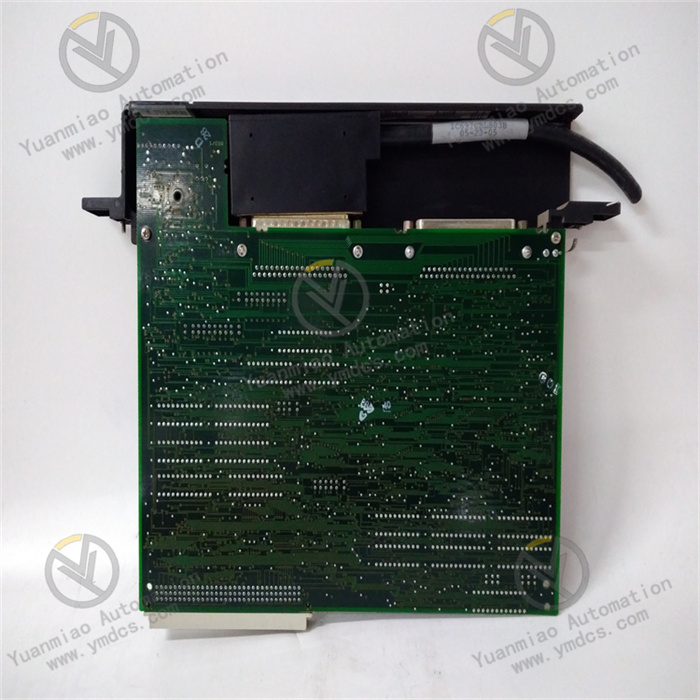
Description
GE IC693CMM301
I. Overview
GE IC693CMM301 is a high-performance industrial-grade communication module and a core communication component of the GE 90-30 series PLCs. Serving as a "bridge" for data interaction between the 90-30 series PLCs, external devices, and upper-level systems, this module undertakes key tasks such as protocol conversion, data transmission, and network management. It is widely used in fields with strict requirements for industrial communication real-time performance and reliability, including automotive manufacturing, food processing, petrochemicals, metallurgical smelting, and water treatment.
Adopting a modular design and industrial-grade enhanced circuit layout, the module features advantages such as multi-protocol compatibility, high-speed communication, and strong anti-interference capability. It enables seamless interconnection between PLCs and devices such as HMIs (Human-Machine Interfaces), SCADAs (Supervisory Control and Data Acquisition systems), PLCs of other brands, and remote I/O devices. Its support for hot-swapping and comprehensive diagnostic mechanisms provides a solid guarantee for the rapid integration, convenient operation and maintenance, and stable operation of industrial control systems, making it a core communication component for building distributed control systems based on the 90-30 series PLCs.
II. Technical Parameters
| Parameter Category | Specific Specifications | Description |
|---|---|---|
| Communication Protocols | Supports Genius Bus protocol; Compatible with Modbus RTU/ASCII protocols (Master/Slave modes); Supports GE SRTP (SuiteLink Real-Time Protocol); Optional PROFIBUS DP slave protocol module | Multi-protocol compatibility adapts to different network architectures, enabling interconnection with GE's own systems and third-party devices |
| Communication Interfaces | 1 Genius Bus interface (RS485 physical layer, shielded twisted pair); 1 RS232/RS485 selectable interface (configured via jumpers); Interface rates: Up to 1Mbps for Genius Bus, 1200-19200bps (adjustable) for serial interface | Dual-interface design meets diverse communication scenarios; Genius Bus supports high-speed bus communication, while the serial interface adapts to point-to-point communication |
| Communication Performance | Maximum number of Genius Bus nodes: 32; Maximum number of slaves in Modbus Master mode: 32; Data transmission delay: ≤10ms for Genius Bus; Maximum transmission distance of serial interface: Up to 1200 meters for RS485 (at 9600bps) | Supports large-scale node access; low latency meets real-time control requirements; long-distance transmission adapts to distributed scenarios |
| Power Supply Parameters | Power supply method: Powered via the backplane bus of the 90-30 series PLC rack; Power supply voltage: DC 5V±5%; Power consumption: ≤5W | Draws power from the PLC backplane, eliminating the need for an additional power supply and simplifying system wiring and power management |
| Compatibility | Compatible with GE 90-30 series PLCs (e.g., CPU311, CPU331, CPU340); Compatible with GE Genius I/O modules and HMIs (e.g., PanelView); Supports interconnection with third-party Modbus devices | Perfectly adapts to the 90-30 series PLCs while being compatible with third-party devices, enhancing system integration flexibility |
| Operating Environment | Operating temperature: 0℃-60℃; Relative humidity: 5%-95% (no condensation); Protection class: IP20 (module body); EMC resistance: Compliant with EN 61000-4-2/3/4 standards | Adapts to cabinet-mounted installation environments; strong anti-interference capability ensures stable communication in complex industrial scenarios |
| Physical Parameters | Dimensions: 100mm×80mm×160mm (L×W×H); Installation method: Slot mounting on 90-30 series PLC racks; Weight: Approximately 350g; Hot-swappable: Yes (compliant with 90-30 series specifications) | Standardized rack installation; compact structure; hot-swapping function improves operation and maintenance convenience |
III. Functional Features
- Multi-Protocol Integration and Flexible Adaptation: It corely supports the GE Genius Bus high-speed bus protocol, which can build a distributed I/O network to realize real-time data interaction among 32 nodes. At the same time, it natively supports Modbus RTU/ASCII protocols and can communicate with third-party Modbus devices (such as frequency converters, sensors, and touch screens) as a master or slave station. By selecting an optional PROFIBUS DP slave module, it can also access the PROFIBUS network, meeting the protocol adaptation needs of different industries and reducing system upgrade costs.
- High-Speed Real-Time Communication Capability: The communication rate of the Genius Bus interface can reach up to 1Mbps, with a data transmission delay of ≤10ms, which can meet scenarios with high real-time requirements such as motion control and precise process adjustment. The bus adopts a token-passing communication mechanism to ensure that each node occupies the communication bandwidth fairly and avoids delay fluctuations caused by data conflicts. The serial interface supports adjustable rates from 1200 to 19200bps to adapt to different transmission distance requirements. The maximum transmission distance in RS485 mode is 1200 meters, meeting the needs of long-distance point-to-point communication.
- Comprehensive Diagnosis and Fault Handling: It has a built-in all-round diagnostic module that can real-time monitor the communication link status, protocol parsing, node online status, and the module's own working status. The LED indicators on the module panel (power, bus activity, fault, node status) intuitively feedback the operation status. For example, the flashing of the Genius Bus activity light indicates normal bus communication, and the steady-on fault light indicates a link interruption or protocol error. At the same time, diagnostic information can be uploaded to the upper-level system through the PLC CPU, providing fault codes and detailed descriptions to facilitate quick problem location.
- Hot-Swapping Support and Convenient Operation & Maintenance: Compliant with the GE 90-30 series hot-swapping specifications, the module can be directly plugged in or out while the PLC is powered on. The replacement process does not affect the operation of the PLC main program or other modules, greatly shortening the fault handling time. Through the GE Proficy Machine Edition configuration software, remote operations such as module parameter configuration, protocol selection, node mapping, and fault query can be realized, eliminating the need for on-site debugging one by one and improving operation and maintenance efficiency.
- Strong Anti-Interference and High-Reliability Design: It uses industrial-grade communication chips and an enhanced circuit layout. The communication interface has a 2500V AC optical isolation function, which can resist ±2kV transient overvoltage shocks. The interior of the module adopts a multi-layer electromagnetic shielding design, which effectively suppresses electromagnetic interference (EMI) and radio frequency interference (RFI) in industrial fields, ensuring stable communication in environments with strong interference such as frequency converters and motors. The Mean Time Between Failures (MTBF) is ≥150,000 hours, meeting the long-term operation requirements of industrial grade.
- Seamless System Integration and Expansion: Specifically designed for the 90-30 series PLCs, after being inserted into the rack, it communicates with the CPU at high speed through the backplane bus. There is no need to write dedicated drivers, and communication parameter configuration and data mapping can be completed by dragging and dropping in the configuration software. It supports the cascading expansion of the Genius Bus network, and the bus transmission distance can be extended to several kilometers through a repeater, adapting to large-scale distributed control systems. At the same time, it supports seamless connection with upper-level software such as GE Proficy SCADA and iFIX to realize centralized data monitoring and management.
IV. Working Principle
- Initialization and Configuration Loading Stage: After the module is installed in the 90-30 series PLC rack, it is powered by DC 5V through the backplane bus and automatically completes initialization after power-on. Then, it loads preset configuration parameters from the PLC CPU memory, including communication protocol type (such as Genius Bus/Modbus), interface rate, node address, and data mapping table. After initialization, the module scans the slave devices in the network through the Genius Bus or serial interface, establishes a device list, and completes communication link negotiation (such as token ring initialization and Modbus slave address matching).
- PLC Data Reception and Protocol Encapsulation Stage: The PLC CPU transmits control commands or data (such as I/O output signals and parameter setting values) that need to be sent to external devices to the CMM301 module through the backplane bus. After receiving the data, the communication processor inside the module encapsulates the data according to the configured communication protocol specifications: under the Genius Bus protocol, information such as node identification, data type, and check code is added; under the Modbus protocol, fields such as slave address, function code, and data length are encapsulated in RTU/ASCII format to form a standard communication data frame.
- Network Data Transmission Stage: The encapsulated data frame is sent to the external network through the corresponding communication interface (Genius Bus or serial interface). The Genius Bus adopts a token-passing mechanism, and the module sends data after obtaining the token to ensure no bus conflicts. The serial interface sends data according to the set baud rate, data bit, and stop bit parameters, and supports multi-node communication in RS485 mode. At the same time, the module real-time monitors the interface status and receives response data uploaded by external devices or actively reported data.
- Network Data Reception and Protocol Parsing Stage: After the module receives the data frame from the external device, the communication processor decapsulates the data frame, removes the protocol header information, and extracts the original data (such as sensor collected values and device status feedback). Then, it verifies the extracted data (such as CRC check and parity check) to determine whether the data is complete and valid. If the data is incorrect, it requests retransmission according to the protocol specifications; if the data is normal, it converts it into a format recognizable by the PLC CPU.
- Data Transmission to PLC and Diagnosis Stage: The parsed valid data is transmitted to the PLC CPU through the backplane bus for logical operation and control decision-making by the CPU. At the same time, the module real-time monitors the communication link status (such as bus disconnection and node offline), protocol parsing (such as invalid data frames), and its own working status (such as abnormal power supply). If an abnormality is detected, it generates fault information, sends it to the CPU through the backplane bus, and drives the fault LED on the panel to light up. The CPU stores the fault information and uploads it to the upper-level system to facilitate handling by operation and maintenance personnel.
V. Common Faults & Solutions
| Fault Phenomenon | Possible Causes | Solutions |
|---|---|---|
| The power light is off after the module is powered on, and communication is unavailable | 1. The module is not properly inserted into the PLC rack slot; 2. The rack backplane bus is faulty and cannot supply power; 3. The module's power circuit is faulty | 1. Power off and reinsert the module to ensure good contact with the slot and secure locking; 2. Move the module to another rack slot; if the light still does not turn on, check the PLC power module and backplane bus; 3. Contact GE after-sales service to inspect the module's power circuit and replace the module if necessary |
| The Genius Bus communication light has no activity, and communication with nodes is unavailable | 1. Damaged bus cable or poor contact; 2. Bus termination resistor (120Ω) not installed; 3. Node address conflict; 4. Mismatched bus communication rate | 1. Replace the shielded twisted pair, check the tightness of bus connectors, and ensure good grounding of the shield layer; 2. Install 120Ω termination resistors at the nodes at both ends of the bus; 3. Modify node addresses through configuration software to ensure all addresses are unique; 4. Confirm that the communication rates of all nodes are consistent and reconfigure the module rate parameters |
| Modbus communication fails, and slave data cannot be read or written | 1. Incorrect serial interface jumper configuration (confusion between RS232 and RS485); 2. Mismatched communication parameters (baud rate, parity bit); 3. Wrong slave address or unresponsive slave; 4. Reversed cable polarity | 1. Adjust the interface jumpers according to the manual to confirm RS232 or RS485 mode; 2. Standardize the communication parameters of the module and slaves and reconfigure them through configuration software; 3. Verify the slave address, test whether the slave responds normally with debugging tools, and replace the faulty slave; 4. Swap the polarity of the RS485 cable (lines A and B) and reconnect |
| Communication data loss or high error rate | 1. Strong electromagnetic interference in the communication link; 2. Unshielded bus cable or ungrounded shield layer; 3. Excessively high communication rate exceeding transmission distance limits; 4. Large power supply voltage fluctuations | 1. Route the communication cable away from interference sources such as frequency converters and motors; add a signal isolator if necessary; 2. Replace with shielded twisted pair and ensure single-ended grounding of the shield layer (ground resistance ≤4Ω); 3. Reduce the communication rate, e.g., lower the Genius Bus rate from 1Mbps to 500kbps; 4. Check the PLC power supply voltage to ensure it is stably within DC 5V±5% and add a power filter |
| The module fails to work normally after hot-swapping | 1. Non-compliant hot-swapping operation (e.g., too fast plugging/unplugging); 2. Oxidized or damaged rack slot contacts; 3. Faulty module hot-swapping control circuit; 4. Lost configuration parameters | 1. Perform hot-swapping strictly in accordance with the manual, ensuring slow and steady plugging/unplugging; 2. Power off and clean the oxide layer on slot contacts; replace the damaged rack if needed; 3. Contact GE after-sales service to inspect the module's hot-swapping control circuit; 4. Re-download parameters to the module through configuration software |
| Some Genius Bus nodes cannot be identified | 1. Node device not powered on or faulty; 2. Node distance from the bus exceeds limits (no repeater used); 3. Node address not within the valid range (1-32); 4. Exceeded maximum number of module nodes | 1. Check the power supply of node devices and replace faulty nodes; 2. Add a Genius Bus repeater in the middle of the bus to extend the transmission distance; 3. Adjust the node address to the range of 1-32 and ensure uniqueness; 4. Reduce the number of bus nodes or add communication modules to share the load |