Description
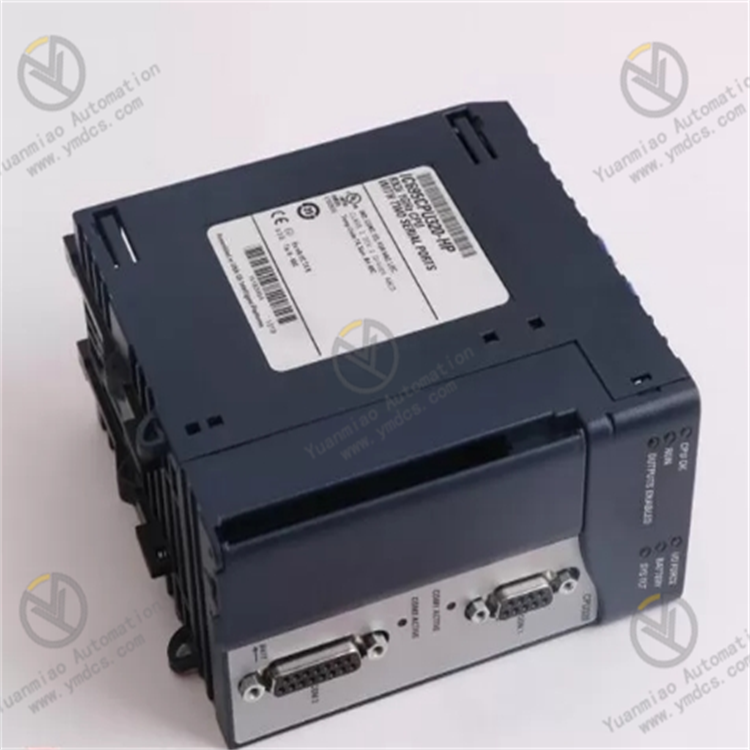
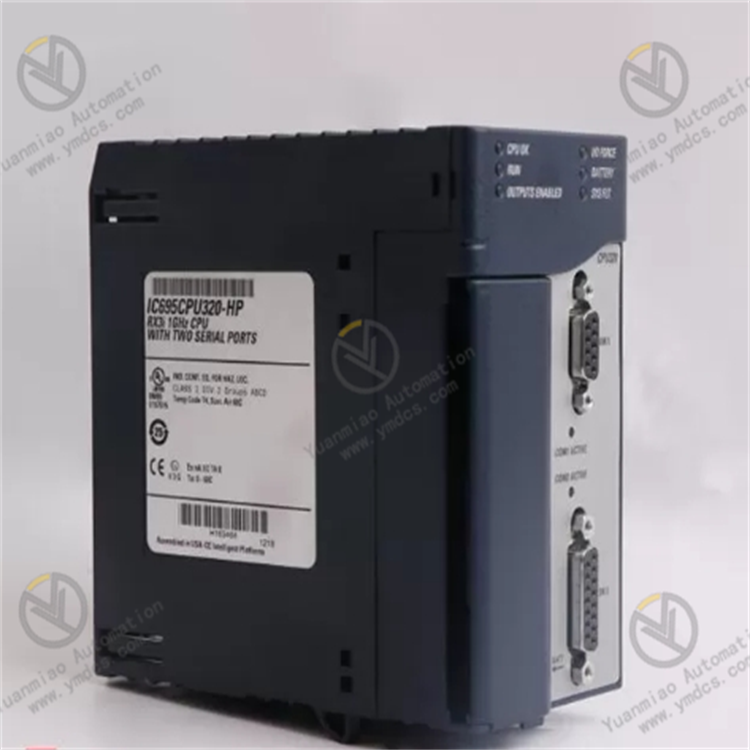
GE IC695CPU320
The GE IC695CPU320 is a controller for the PACSystems RX7i series. As the mid-range flagship model of this series, it is specifically designed for centralized control scenarios in medium-to-large industrial automation systems.
Its core function is to manage various I/O modules, communication modules, and special-function modules via the backplane bus. It enables real-time acquisition of digital and analog signals in industrial production processes, arithmetic processing, and issuance of control commands. Meanwhile, it supports multi-protocol communication and the construction of distributed control architectures.
With its high-performance processor, extensive expandability, and industrial-grade reliability, this controller is widely used in medium-to-large control scenarios such as automotive welding production lines, chemical process control, metallurgical rolling control, and warehouse logistics automation. It serves as the core hub component for building PACSystems RX7i systems.
I. Technical Parameters
1. Computing Performance Parameters
- Equipped with a 32-bit multi-core processor, featuring a main processor frequency of 800MHz and a coprocessor frequency of 400MHz.
- Program memory capacity: 8MB (expandable to 16MB); data memory capacity: 4MB (expandable to 8MB).
- Supports IEC 61131-3 standard programming languages including Ladder Diagram (LD), Function Block Diagram (FBD), and Structured Text (ST).
- Program execution speed: ≤0.01μs per LD instruction; ≤0.05μs per ST instruction.
- Supports multi-task scheduling, allowing configuration of up to 32 tasks with 16 priority levels. The scan cycle for the highest-priority task is ≤1ms.
2. Expansion and Backplane Parameters
- Compatible with standard backplanes of the PACSystems RX7i series, supporting backplane configurations with up to 16 slots (compatible with backplanes such as the IC695CHS790 series).
- Backplane bus speed: 1Gbps; data transmission delay between modules: ≤5μs.
- Supports a multi-master backplane architecture, enabling high-speed data interaction between the controller and remote I/O stations.
- Supports hot-swap functionality (requires matching hot-swap modules), allowing replacement of I/O modules without system shutdown to improve system availability.
3. Communication Parameters
- Integrates 2 Gigabit Ethernet ports (supporting protocols such as TCP/IP, Modbus/TCP, and EtherNet/IP) and 1 RS-232/485 universal serial port (supporting the Modbus-RTU protocol).
- Supports mainstream industrial fieldbuses including PROFINET, DeviceNet, and ControlNet (requires matching communication modules).
- Features redundant communication capabilities: Ethernet ports support ring network redundancy (MRP protocol), with a communication interruption recovery time of ≤10ms.
- Can connect to up to 256 remote I/O nodes; maximum distributed control distance: ≤1000 meters (up to 20 kilometers with fiber optic transmission).
4. Environmental and Physical Parameters
- Operating temperature: 0℃ ~ 60℃; storage temperature: -40℃ ~ 85℃.
- Relative humidity: 5% ~ 95% (non-condensing).
- Vibration resistance rating: IEC 60068-2-6 (10Hz ~ 500Hz, acceleration: 5g).
- Shock resistance rating: IEC 60068-2-27 (peak acceleration: 15g, duration: 11ms).
- Protection rating: IP20 (panel mounting), suitable for installation inside industrial control cabinets.
- External dimensions: 140mm × 180mm × 80mm (compliant with standard dimensions of RX7i series modules); supports rail-mounted or rack-mounted installation, and is compatible with DIN rail fixing.
II. Functional Features
The IC695CPU320 is designed around the core concepts of "high-performance computing, flexible expansion, and reliable control." Its functional features fully meet the strict requirements of medium-to-large industrial control, with key advantages as follows:
1. Multi-Core Parallel Computing for Complex Control
- Adopts a multi-core processor architecture: the main processor handles core control logic operations, while the coprocessor focuses on data preprocessing, communication protocol parsing, and fault diagnosis, enabling parallel processing of computing tasks.
- The 8MB program memory can store large-scale control programs (supporting over 100,000 LD instructions), and the 4MB data memory can cache massive collected data. It is suitable for complex scenarios such as multi-axis coordinated control of automotive welding lines and multi-loop cascade control in chemical processes.
2. Flexible Expandability for System Upgrades
- Supports backplane expansion with up to 16 slots, and is compatible with all I/O modules (e.g., analog input module IC695ALG600, digital output module IC695DOE104), special-function modules (e.g., motion control module IC695MOT100, PID control module IC695PBD300), and communication modules of the RX7i series. System function upgrades can be achieved without replacing the controller.
- Supports remote I/O expansion: a distributed control architecture can be built via communication modules to meet the multi-area control needs of large workshops.
3. Multi-Protocol Communication and Redundancy Design
- Integrated Gigabit Ethernet ports support multiple industrial Ethernet protocols, enabling direct communication with HMI, SCADA systems, and third-party devices without additional protocol conversion modules.
- Ethernet ring network redundancy ensures fast switching in case of communication link failures, with a recovery time of ≤10ms, avoiding production downtime caused by communication interruptions.
- Supports the OPC UA protocol, facilitating data interaction with upper-level information systems such as MES and ERP to support Industry 4.0 upgrades.
4. Industrial-Grade Reliable Control and Intelligent Operation & Maintenance
- Adopts a dual fault monitoring mechanism of "hardware watchdog + software monitoring" to real-time monitor program operation, module communication, and power supply status. In case of faults, it can trigger redundant switching or safe shutdown.
- Built-in data logging function can store over 100,000 fault logs and process data, supporting remote reading via Ethernet.
- On-board LED status indicators (power, operation, fault, communication) clearly display the working status. When used with GE Proficy Machine Edition software, it enables remote programming, debugging, and diagnosis.
III. Working Principle
As the "control hub" of the PACSystems RX7i system, the core workflow of the IC695CPU320 revolves around "module management - data acquisition - logic computing - command execution - communication interaction," achieving overall management of the entire control system. The specific links are as follows:
1. System Initialization and Module Configuration
- After power-on, the controller automatically executes the initialization process, identifies all connected modules (I/O modules, communication modules, etc.) via the backplane bus, and reads module IDs and configuration information.
- System configuration parameters (including module addresses, acquisition cycles, communication protocols, and task scheduling strategies) are issued via Proficy Machine Edition software to complete system setup.
2. Data Acquisition and Preprocessing
- According to the configured acquisition cycle, collected data (digital status, analog values, etc.) from each I/O module is read in batches via the 1Gbps high-speed backplane bus.
- The coprocessor preprocesses the collected data, including filtering and noise reduction, range conversion, and outlier judgment. Invalid data is discarded before the remaining data is stored in the data memory, and the data image area is updated in real time.
3. Logic Computing and Command Issuance
- The main processor schedules and executes control programs according to task priorities, and performs logic computing (such as interlock control, PID regulation, and multi-axis coordination algorithms) based on real-time data in the data image area.
- After computing is completed, control commands are generated and issued to each output module via the backplane bus, driving actuators (such as solenoid valves, servo motors, and control valves) to operate, realizing precise control of the production process.
4. Communication Interaction and Fault Handling
- Real-time data interaction is conducted with upper-level systems (HMI, SCADA) via Ethernet ports: collected data, equipment status, and fault information are uploaded, and control parameter adjustment commands issued by the host computer are received.
- Meanwhile, communication with on-site equipment is achieved via serial ports or communication modules to implement distributed control.
- If module faults, communication interruptions, or program abnormalities are detected, an alarm is triggered immediately. If redundancy is configured, automatic switching to standby modules or links is performed to ensure stable system operation.
IV. Common Faults and Troubleshooting Methods
Based on operational experience in medium-to-large industrial control scenarios, common faults of the IC695CPU320 mainly focus on system startup, module communication, and computing abnormalities. The following are typical faults and practical troubleshooting methods:
1. Fault 1: Controller Fails to Start, Power Indicator Not Lit
- Possible Causes: Abnormal power supply voltage (no standard DC 24V connected), loose/broken power connections, faulty internal power circuit of the controller, short circuit caused by backplane faults.
- Troubleshooting:① Use a multimeter to detect the power supply voltage, confirm it is DC 24V±10%, and check the power module if the voltage is abnormal.② Power off, re-tighten the power connection terminals, and check if the wiring is correct (distinguish between positive and negative poles).③ Disconnect all modules, leaving only the controller and power module. If the system starts normally, a short circuit exists in one of the modules; reconnect modules one by one to identify the faulty one.④ If the controller still fails to start, its internal circuit is faulty and needs to be returned to the factory for repair.
2. Fault 2: A Module Cannot Be Recognized by the Controller, Backplane Indicator Abnormal
- Possible Causes: Module not installed properly (poor contact of backplane pins), module address conflict, faulty module, faulty backplane bus.
- Troubleshooting:① Power off, reinsert the module to ensure tight contact between the module and the backplane.② Check module addresses via Proficy software to confirm no conflicts; reassign addresses if conflicts exist.③ Move the faulty module to a spare slot. If it still cannot be recognized, the module is faulty; replace it with a spare module.④ Test with a spare backplane. If the problem is resolved, the original backplane is faulty.
3. Fault 3: Abnormal Program Operation, Controller Reports "Computing Timeout" Fault
- Possible Causes: Control program logic error (e.g., infinite loop), unreasonable task scheduling configuration (excessive high-priority tasks), insufficient memory (program or data memory overflow), processor overload.
- Troubleshooting:① Connect to the controller via Proficy software, read fault logs to locate the abnormal program segment, and correct the logic error.② Optimize task scheduling: reduce the number of high-priority tasks and reasonably allocate task cycles.③ Check program and data memory usage; expand memory or streamline the program if usage exceeds 80%.④ Monitor processor load; split control logic into distributed nodes if the load continuously exceeds 90%.
4. Fault 4: Ethernet Communication Interrupted, Unable to Interact with Host Computer
- Possible Causes: Broken/poorly connected Ethernet cable, IP address conflict, incorrect communication protocol configuration, faulty Ethernet port, abnormal ring network redundancy configuration.
- Troubleshooting:① Use a cable tester to check Ethernet cable continuity; reinsert the RJ45 connector to ensure tight contact.② Verify the IP addresses of the controller and host computer to ensure they are on the same network segment with no conflicts.③ Check communication protocol configurations (e.g., Modbus/TCP slave address) to ensure consistency with the host computer.④ Switch to a spare Ethernet port for testing; if communication is restored, the original port is faulty.⑤ For ring network architectures, check the ring network redundancy configuration and restart the ring network management node.