Description
ABB TK681 1SAP500981R0001
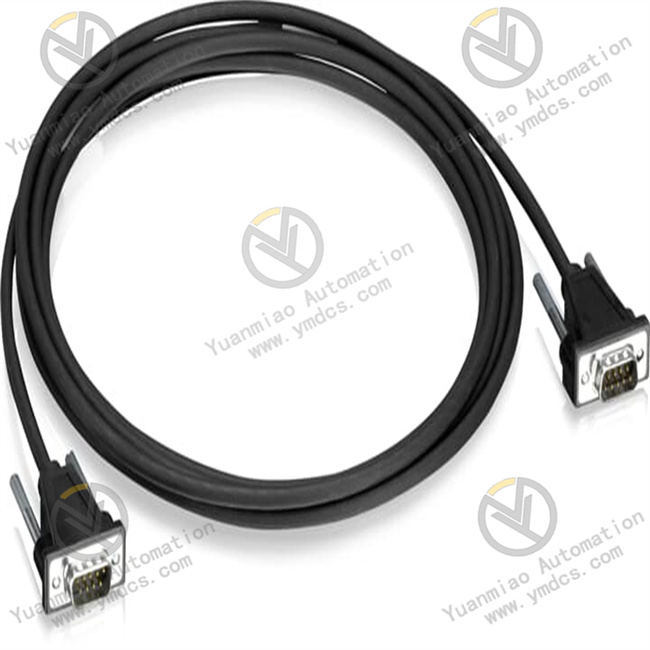
ABB TK681 (1SAP500981R0001) is a dedicated RS232 communication cable for connecting CP600 series HMI to AC500 V2 series PLC. It features DB9 (9-pin D-Sub) connectors on both ends and a 3-meter length, enabling point-to-point data exchange between HMI and PLC, serving as a key connection component for on-site human-machine interaction and control logic linkage.
I. Core Functions & Technical Advantages
1. Core Functions
- Point-to-Point Communication Connection: Standard RS232 interface, connecting the DB9 serial port of CP600 HMI to the COM port of AC500 V2 CPU module, realizing high-speed and stable data exchange between HMI and PLC, supporting interaction requirements such as command issuance, status feedback, and variable reading/writing.
- Plug-and-Play Compatibility: Factory-prefabricated cable with pin definitions fully matching the RS232 communication protocols of AC500 V2 and CP600. No additional wiring configuration is required; it can be connected directly out of the box, significantly reducing on-site commissioning time.
- Industrial-Grade Anti-Interference: Adopts a shielded cable structure to effectively suppress electromagnetic interference in industrial sites, ensuring pure communication signals, avoiding faults such as data packet loss and bit errors, and guaranteeing the stability of HMI-PLC linkage.
- Standardized Interface: Equipped with DB9 male/female connectors on both ends (matching the interface definitions of CP600 and AC500 V2), convenient for plugging and unplugging, supporting quick replacement during later maintenance or system expansion, and reducing maintenance difficulty.
2. Key Advantages
- High Reliability: The housing is made of flame-retardant engineering plastic, and the connector contacts are gold-plated, oxidation-resistant and corrosion-resistant, adapting to the long-term operation requirements of industrial control cabinets. The cable is flexible, bend-resistant and tensile-resistant, capable of withstanding on-site frequent operations and vibration impacts.
- Genuine Compatibility: Designed and manufactured by ABB, 100% compatible with all CP600 series HMI and AC500 V2 series PLC. It avoids hidden dangers such as pin misalignment and signal interference from third-party cables, ensuring the stability and reliability of the communication link.
- Convenient Operation & Maintenance: 3-meter standard cable length, suitable for the connection distance in conventional control cabinets, flexible layout. Clear cable identification facilitates on-site identification and management.
- Compliant Safety: Complies with IEC industrial electrical safety standards, with good insulation performance, avoiding electrical safety risks during communication, and suitable for use in multiple scenarios such as factory automation and process control.
II. Technical Specifications
| Category | Item | Value |
|---|---|---|
| Basic Specs | Model | TK681 (1SAP500981R0001) |
| Product Type | RS232 Communication Cable for CP600 to AC500 V2 | |
| Interface Type | DB9 (9-pin D-Sub) Connector on Both Ends | |
| Cable Length | 3 Meters | |
| Communication Protocol | RS232 | |
| Electrical Specs | Transmission Rate | Compatible with Default RS232 Baud Rate of AC500 V2 (e.g., 9600/19200bps, Software Configurable) |
| Contact Material | Gold-Plated | |
| Insulation Grade | Complies with Industrial Electrical Safety Standards | |
| Environ. & Mech. | Operating Temp | 0~60℃ |
| Storage Temp | -40~70℃ | |
| Protection Degree | IP20 for Cable Body, Suitable for IP54 and Above Control Cabinet Environment for Connectors | |
| Weight | Approx. 0.12 kg | |
| Material | Cable: Shielded Twisted Pair; Housing: Flame-Retardant Engineering Plastic |
III. Application Areas
- Factory Automation: In production lines such as automotive manufacturing, electronic processing, and food and beverage, monitor the operating status of AC500 V2 PLC through CP600 HMI to realize operations such as parameter modification and start/stop control.
- Process Industry: In scenarios such as petrochemical, metallurgical, and water treatment, realize real-time monitoring of process parameters and accurate issuance of commands through data exchange between HMI and PLC.
- Infrastructure: In rail transit, power substation auxiliary systems, and building automation, realize communication connection between HMI and AC500 V2 PLC, ensuring the visibility and controllability of system operation and maintenance.
- System Commissioning & Maintenance: Used for quick communication link testing during new system installation, and for fault diagnosis during old system maintenance by directly connecting HMI and PLC to read logs.
IV. Installation & Commissioning Guide
1. Pre-Installation Preparation
- Model & Interface Verification: Confirm that the devices used are CP600 HMI and AC500 V2 PLC (TK681 is not compatible with AC500 V1 or other series). Check the COM port of HMI and the serial port interface type of PLC (both are DB9). Confirm that the cable package is intact, and the connector is free of damage and pin bending.
- Safety Preparation: Disconnect the power of HMI and PLC, wait for the device capacitor to discharge for ≥ 5 minutes, avoid damaging the interface chip by hot-plugging the cable with power on; wear an anti-static wristband to prevent static interference to the communication module.
- Environment & Tools: The installation environment shall be dry, free of condensation and strong electromagnetic interference. Prepare a Phillips screwdriver (to fix the connector screws), a multimeter (to detect continuity), and a cleaning brush (to clean the interface dust).
2. Hardware Connection
- Interface Cleaning: Use a cleaning brush to clean the dust and foreign matter in the DB9 interfaces of HMI and PLC to ensure clean interface contacts and avoid poor contact.
- Cable Connection: Insert one end of the TK681 cable into the serial port of the CP600 HMI, push it gently and tighten the connector fixing screws; insert the other end into the COM port of the AC500 V2 PLC, and tighten the screws as well to ensure a firm connection.
- Connection Check: Pull both ends of the cable with both hands to confirm that the connectors are not loose. Check whether the cable routing is smooth and avoid being squeezed or bent by cabinet components to protect the cable insulation layer.
3. Commissioning & Verification
- Power-On Configuration: Power on the HMI and PLC at the same time. Configure the RS232 communication parameters (baud rate, data bits, stop bits, parity bits) through the HMI system settings, which must be completely consistent with the COM port parameters of the PLC (default matching the AC500 V2 factory parameters).
- Communication Test: Create simple variables on the HMI (such as reading the input status and output control of the PLC), download them to the HMI and run, observe whether the variables are updated in real time; or monitor the commands sent by the HMI through the PLC programming software to confirm the normal communication link.
- Stability Test: Tap the cabinet lightly during operation to simulate on-site vibration, observe whether the communication between HMI and PLC is interrupted, and verify the anti-vibration performance of the cable.
V. Common Problems & Solutions
| Common Problem | Troubleshooting & Handling |
|---|---|
| No Communication Response | 1. Check if the wiring is correct (whether the DB9 interfaces on both ends are inserted tightly and the screws are tightened); 2. Check if the RS232 parameters (baud rate, parity bits, etc.) of HMI and PLC are consistent; 3. Use a multimeter to detect the continuity of the cable to determine if there is an internal open circuit; 4. Check if the interface contacts are oxidized or contaminated, and clean them before retrying |
| Data Transmission Error/Packet Loss | 1. Confirm that the cable is a shielded cable and the shield layer is reliably grounded; 2. Check if there are strong electromagnetic interference sources (such as inverters, motors), and add a shield or adjust the cable routing if necessary; 3. Replace the TK681 cable to eliminate cable damage failure |
| Poor Connector Contact | 1. Clean the dust and foreign matter in the interface, check if the pins are bent or oxidized; 2. Re-plug the connector and tighten the fixing screws; 3. If the connector pins are damaged, replace the new cable |
| Cable Overheating/Damage | 1. Check if the operating temperature exceeds 60℃ and optimize the heat dissipation of the control cabinet; 2. Avoid the cable being scratched or squeezed by sharp components, repair or replace the damaged cable; 3. Confirm no overloaded use, and troubleshoot electrical faults conducted to the cable if necessary |