Description
ABB TK851V010 3BSC950262R1
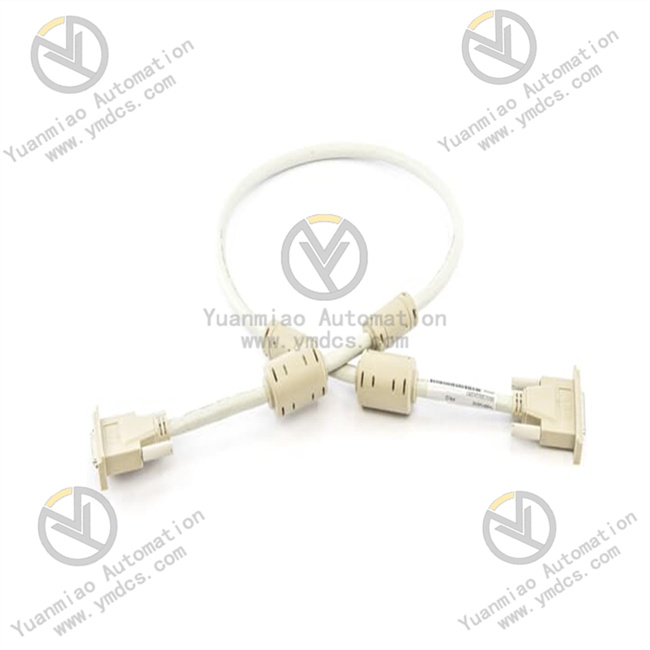
ABB TK851V010 (3BSC950262R1) is a 1-meter dedicated exchange connection cable for connecting RCU (Remote Control Unit) and BC810 communication modules in the AC 800M control system. As the core transmission component of the CEX bus link, it enables high-speed, reliable data interaction between the control unit and remote stations, serving as a key "nerve link" for the distributed architecture of process automation systems.
I. Core Functions & Technical Advantages
1. Core Functions
- RCU Link Connection: Specifically designed for the connection between RCU and BC810 modules, it builds a stable CEX bus communication channel, supporting core interactions such as command transmission, status feedback, and data acquisition, ensuring real-time linkage between remote control units and the main controller.
- BC810 Interconnection Support: As a supporting connection component for BC810 communication modules, it adapts to bus expansion and redundancy configuration between modules, helping the system build a distributed control network and expand the control scope and redundancy reliability.
- 1-Meter Standard Adaptation: The 1-meter standard cable length accurately adapts to the conventional connection distance between modules in the AC 800M control cabinet. No additional cutting or extension is required; it can be deployed directly out of the box, greatly reducing on-site wiring man-hours.
- Industrial-Grade Transmission Guarantee: Adopts industrial-grade shielded cables and high-precision connectors, effectively resisting electromagnetic interference, ensuring data transmission integrity and low latency, meeting the stable operation requirements of harsh industrial sites.
2. Key Advantages
- Genuine Precision Compatibility: Designed and manufactured by ABB, 100% matching the interface definitions and communication protocols of RCU and BC810 modules in the AC 800M series. It eliminates hidden dangers such as pin misalignment and signal interference from third-party cables, ensuring zero faults in the communication link.
- High Durability Design: The cable uses flame-retardant insulating materials, and the connector contacts are gold-plated, with bending resistance, tensile resistance, and corrosion resistance. It adapts to a wide temperature range of -25℃~+70℃ (some scenarios adapt to -40℃~+85℃), suitable for long-term operation in industrial sites[12].
- Easy Installation & Maintenance: Standardized interface design, convenient plugging and unplugging, firm connection, supporting quick replacement and expansion; clear cable identification facilitates on-site identification and management, reducing later maintenance difficulty.
- Compliant Safety Certification: Passes international electrical safety certifications such as CE and UL, with excellent insulation performance, avoiding electrical safety risks during communication, and adapting to stringent application scenarios in industries such as chemical engineering, electric power, and metallurgy.
II. Technical Specifications
| Category | Item | Value |
|---|---|---|
| Basic Specs | Model | TK851V010 (3BSC950262R1) |
| Product Type | AC 800M RCU & BC810 Exchange Connection Cable | |
| Cable Length | 1 Meter (1000mm) | |
| Applicable System | ABB AC 800M Controller | |
| Core Usage | RCU Link Cable, BC810 Interconnection Cable | |
| Electrical Specs | Interface Type | Industrial Special Shielded Connector |
| Transmission Medium | Shielded Twisted Pair (STP) | |
| Contact Material | Gold-Plated | |
| Insulation Grade | Complies with IEC Industrial Electrical Safety Standards | |
| Environ. & Mech. | Operating Temp | -25℃~+70℃ (Some Scenarios: -40℃~+85℃)[12] |
| Storage Temp | -40℃~+85℃ | |
| Protection Degree | IP20 (Cable Itself), Suitable for IP54+ Control Cabinet Environment | |
| Tensile Strength | ≥100N | |
| Weight | Approx. 0.42kg | |
| Place of Origin | Sweden |
III. Application Areas
- Process Control: Continuous production processes such as chemical engineering, petroleum, pharmaceuticals, and food and beverage. It is used for data interaction between RCU and the main controller to realize real-time monitoring of process parameters, remote adjustment, and fault emergency handling.
- Distributed Control: Large-scale distributed scenarios such as power substations, metallurgical production lines, and water treatment systems. It expands the control scope through BC810 interconnection and builds a redundant and reliable control network.
- System Commissioning & Expansion: Quickly establish the communication link between RCU and BC810 for parameter configuration and function verification during new system installation; when expanding old systems, new modules are easily connected to improve system scalability.
- Infrastructure Control: Fields such as rail transit, building automation, and energy management. It ensures stable communication between remote control units and the main station, supporting efficient operation and maintenance of infrastructure.
IV. Installation & Commissioning Guide
1. Pre-Installation Preparation
- Model & Interface Verification: Confirm that the used equipment is the RCU and BC810 modules of AC 800M. Check the integrity of the cable package, no damage to the connector, and no bending of pins to ensure complete matching with the interface type.
- Safety Preparation: Disconnect the power of RCU, BC810 and related modules, wait for capacitor discharge ≥5 minutes to avoid damaging the interface chip by hot-plugging; wear anti-static wristband to prevent static interference to communication modules.
- Environment & Tools: The installation environment shall be dry, free of condensation and strong electromagnetic interference; prepare a Phillips screwdriver (to fix the connector screws), a multimeter (to detect continuity), and a cleaning brush (to clean the interface dust).
2. Hardware Connection
- Interface Cleaning: Use a cleaning brush to remove dust and foreign matter in the interfaces of RCU and BC810 modules to ensure clean interface contacts and avoid poor contact.
- Cable Connection: Insert the connectors at both ends of the TK851V010 cable into the communication interface of RCU and the corresponding interface of BC810 module respectively, push gently and tighten the connector fixing screws to ensure a firm connection.
- Wiring Check: Sort out the cable routing, avoid being squeezed or bent by cabinet components, reserve an appropriate amount of slack, resist on-site vibration impact, and protect the cable insulation layer.
3. Commissioning & Verification
- Power-On Configuration: Power on the RCU, BC810 and related modules at the same time. Check the communication parameters (baud rate, node address, etc.) of RCU and BC810 through AC 800M control software (such as Control Builder) to ensure consistency with the system configuration.
- Communication Test: Read the status data, input and output signals of RCU in the software to verify whether the data is updated in real time; issue control commands through the software and observe the execution feedback of RCU to confirm the normal communication link.
- Stability Test: Tap the cabinet lightly during operation to simulate on-site vibration and observe whether the communication is interrupted; run continuously for more than 30 minutes, monitor whether there is packet loss or delay in data transmission, and verify the stability of the link.
V. Common Problems & Solutions
| Common Problem | Troubleshooting & Handling |
|---|---|
| No Communication Response | 1. Check if the wiring is inserted tightly and the screws are tightened; 2. Check if the communication parameters of RCU and BC810 are consistent; 3. Use a multimeter to detect cable continuity and eliminate internal open circuit faults; 4. Clean interface contacts to remove oxidation/contamination |
| Data Transmission Error/Packet Loss | 1. Confirm that the cable is shielded and the shield layer is reliably grounded; 2. Troubleshoot on-site electromagnetic interference sources (such as inverters, motors), optimize cable routing or add shielding; 3. Replace the TK851V010 cable to eliminate cable damage problems |
| Poor Connector Contact | 1. Clean dust and foreign matter in the interface, check if the pins are bent or oxidized; 2. Re-plug the connector and fasten the screws; 3. If the pins are damaged, replace the new cable |
| Cable Aging/Damage | 1. Check if the working temperature exceeds the range and optimize the heat dissipation of the control cabinet; 2. Avoid the cable being scratched or squeezed by sharp components; 3. Replace the original cable directly when aging or damaged seriously |